Switching from Jobber for Pest Control: How to Migrate and What to Move To (2026)
PestGrade is reader-supported. When you sign up for a tool through our links, we may earn a commission, at no cost to you, and it never affects our rankings. How we grade →
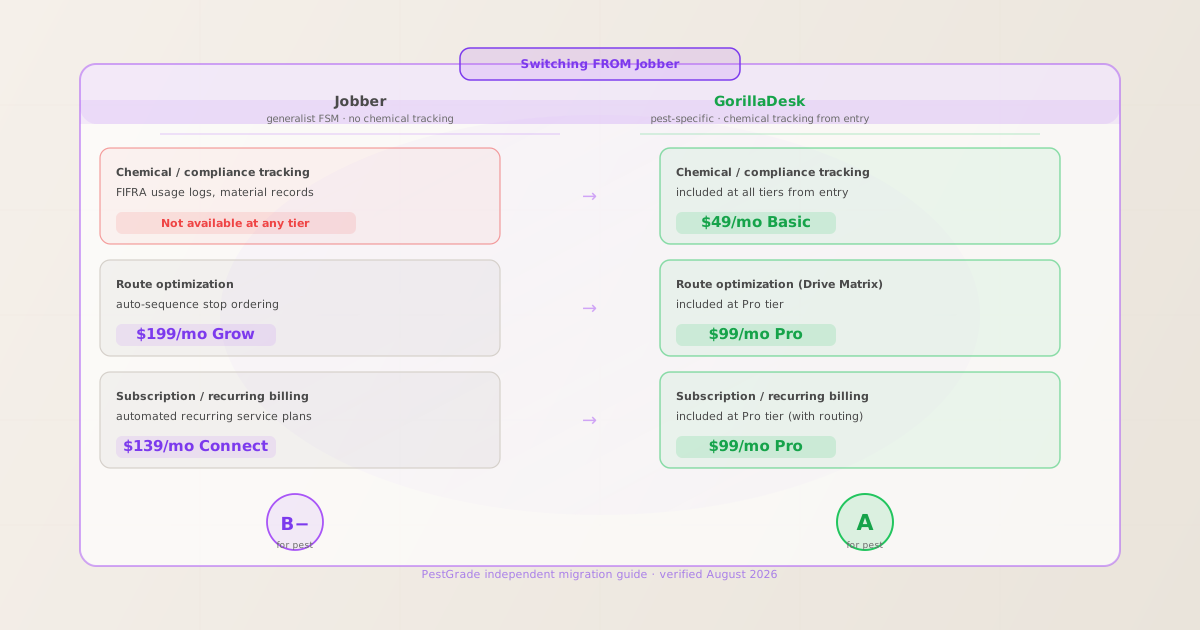
For most dedicated pest operators leaving Jobber: GorillaDesk ($49/mo, chemical tracking from entry, no contracts, free data migration). Jobber earns 4.6/5 from 1,471 GetApp reviews, but it has no pesticide compliance tracking at any price tier. For a dedicated pest shop, that gap is usually the deciding factor.
The short answer: who should switch from Jobber and where to go
- Leaving because Jobber has no chemical tracking: GorillaDesk
- This is the most direct path. GorillaDesk Basic ($49/mo, month-to-month, no contracts) includes FIFRA-compliant pesticide and chemical application logging from the entry tier. That feature does not exist at any Jobber tier. GorillaDesk Pro ($99/mo) adds Drive Matrix route optimization and subscription billing, unlocking both routing and recurring service plans on the same tier for $60/mo less than Jobber’s Grow plan. GorillaDesk earns 4.8/5 from 277 GetApp reviews (verified August 10, 2026) and offers free data migration assistance to ease the import of your client records from Jobber.
- Leaving because the per-user pricing grows too fast: GorillaDesk or Fieldwork
- Jobber charges $29/mo per additional user beyond the plan base. At three field technicians, that adds $58/mo to your monthly bill before any tier upgrades. GorillaDesk Basic includes unlimited admin users and unlimited mobile devices at $49/mo flat. Fieldwork ($59/mo Startup, $79/mo Business with route optimization) uses per-tech flat pricing, but unlike Jobber it includes CA/NY-specific pesticide compliance report formats at Business tier. For operations that grew past 2–3 users and felt the Jobber per-seat cost start to sting, GorillaDesk’s flat pricing is the structural fix.
- Leaving because Jobber is not pest-specific enough: GorillaDesk or FieldRoutes
- Jobber is a generalist field service platform built for trades broadly (HVAC, plumbing, landscaping, pest control). It has no termite inspection form support, no device/bait-station tracking, no pesticide record-keeping module, and no state-specific compliance output at any tier (confirmed from published feature documentation, August 10, 2026). If your operation needs any of those, no upgrade path within Jobber will deliver them. GorillaDesk covers chemical logging and device tracking at $99/mo Pro. For commercial operations needing Sentricon bait-station barcoding and enterprise reporting, FieldRoutes is the appropriate destination, though it does not publish pricing.
- Staying on Jobber makes sense if: you run a multi-trade field service operation, not pest-only
- Jobber is genuinely strong as a generalist field service tool. If your operation includes pest control alongside HVAC, lawn care, or other trades, the breadth of Jobber’s feature set, its 100+ app integrations, and its high review volume (4.6/5 from 1,471 GetApp reviews) may continue to outweigh the pest-specific gaps. Pest-only shops running quarterly service programs with any chemical compliance requirement will hit the ceiling, but a mixed-trade business that handles pest jobs without needing FIFRA logs may be fine to stay.
Why pest operators leave Jobber
- No chemical tracking at any tier
- This is the single most-cited reason dedicated pest shops leave Jobber. FIFRA requires pesticide application records (product name, EPA registration number, application site, quantity, applicator license). Jobber does not include a pesticide usage log, chemical inventory, or compliance record module at any plan tier as of August 10, 2026, verified against Jobber’s live pricing and feature pages. Some operators work around this with external spreadsheets or paper logs, which is legally sufficient but defeats the operational efficiency argument for software. GorillaDesk resolves this from entry at $49/mo.
- Routing is expensive and late in the tier ladder
- Route optimization on Jobber requires the Grow plan. At $199/mo (month-to-month) or $120/mo (annual prepaid), that is the third tier up from Core. GorillaDesk Pro ($99/mo) includes Drive Matrix routing alongside chemical tracking and subscription billing on the same plan. For an operator running 6–10 recurring service stops per day, paying $199/mo for routing alone, without chemical compliance, represents a structural mismatch with the platform.
- Per-user pricing escalates quickly
- Jobber’s base plans include 1 user (Core, Connect) or a small allowance (Connect allows up to 5; Grow allows up to 10). Additional users beyond the plan base cost $29/mo each (verified August 10, 2026). A 3-tech crew on Jobber Grow would be paying $199/mo plus $29/mo per additional tech, or $257/mo for 3 users compared to GorillaDesk Pro’s $99/mo with unlimited users. Operators who reviewed this math on GetApp consistently cite the per-user escalation as the friction that pushed them to evaluate alternatives.
- No termite inspection forms or WDO reports
- Termite operators need Wood-Destroying Organism (WDO/WDIR) report forms and diagram support for inspections. Jobber has no native support for these. This is not a gap that a higher-tier plan closes; it is a structural limitation of a generalist platform. PestPac and FieldRoutes both include commercial pest documentation at their enterprise tiers; GorillaDesk covers basic compliance and device tracking at $99/mo Pro.
Best-fit replacements by situation
Verified pricing against each vendor’s live pricing page on August 10, 2026. Jobber pricing: Core $49/mo ($24/mo annual prepaid), Connect $139/mo ($80/mo annual), Grow $199/mo ($120/mo annual), Plus $499/mo ($320/mo annual). Additional users $29/mo each.
| Feature |  Jobber (leaving) Jobber (leaving) |
 GorillaDesk GorillaDesk |
 FieldRoutes FieldRoutes |
Fieldwork |
|---|---|---|---|---|
| Entry price | $49/mo Core ($24/mo annual) | $49/mo Basic | Not publicly listed | $59/mo Startup per tech |
| Chemical / compliance tracking | ✗ Not available at any tier | ✓ Basic $49/mo onward | ✓ Both tiers | ✓ CA/NY formats, $79/mo Business |
| Route optimization | Grow $199/mo ($120/mo annual) | ✓ Pro $99/mo (Drive Matrix) | ✓ Both tiers (Intelligent Routing) | ✓ $79/mo Business |
| Subscription / recurring billing | Connect $139/mo ($80/mo annual) | ✓ Pro $99/mo | ✓ Both tiers | Not confirmed on public pages |
| QuickBooks sync | ✓ Connect $139/mo ($80/mo annual) | ✓ Pro $99/mo | Not publicly listed | ✓ All tiers |
| Customer portal | ✓ All tiers (Client Hub) | ✓ Pro $99/mo | Not publicly listed | Not publicly listed |
| Free trial | ✓ 14-day, Grow plan | ✓ Free trial via signup | ✗ Demo only | ✓ 14-day, no credit card |
| Contracts | Month-to-month or annual | No contracts, cancel anytime | Not publicly listed | Not publicly listed |
| Data migration assistance | — | ✓ Free migration assistance | Customer success team | Not publicly listed |
| Best for | Multi-trade field service | Dedicated pest shops | Commercial multi-truck | CA/NY compliance operators |
“—” means not publicly listed. Pricing verified August 10, 2026.
How migration from Jobber actually works
Jobber to GorillaDesk is one of the most documented migration paths in the independent pest operator community. Here is the practical sequence based on GorillaDesk’s published onboarding process and operator-reported experience (GetApp, verified August 2026):
- Step 1: Export your Jobber data before cancelling
- From your Jobber account, go to Reports and export your client list (name, address, phone, email, service tags), work order history, and invoice records as CSV files. Download your recurring job schedules and note their service intervals (monthly, quarterly, seasonal) so you can recreate them in the new system. Jobber allows CSV export at all plan levels. Do this before cancelling or downgrading your plan, as access to historical records may be limited after cancellation depending on Jobber’s current data-retention policy.
- Step 2: Start a GorillaDesk trial and run both accounts in parallel
- GorillaDesk offers a free trial via account signup. Sign up, then contact GorillaDesk’s onboarding team to start the complimentary data migration process. They accept CSV imports from Jobber for client records and service history. Run both accounts in parallel for 1–2 weeks minimum so your field techs can learn the GorillaDesk mobile app while jobs are still tracked in Jobber as a safety net. During this period, confirm that your recurring service schedules were imported correctly and that the chemical tracking fields match your record-keeping workflow.
- Step 3: Confirm chemical tracking fields match your compliance requirements
- GorillaDesk’s chemical tracking includes pesticide product name, EPA registration number, application rate, and treated areas. Before fully migrating, verify that the fields capture everything your state’s pesticide records law requires. Most US states align with federal FIFRA record-keeping requirements, but some states (e.g., California) have additional requirements. GorillaDesk’s support can advise on field configuration. This verification step is worth doing before you process real jobs in GorillaDesk so you do not need to retroactively re-enter applications.
- Step 4: Retrain field technicians on the GorillaDesk mobile app
- GorillaDesk’s mobile app is one of its strongest-reviewed elements (4.8/5 across platforms, verified August 2026). Most operators migrating from Jobber report the GorillaDesk app learning curve is shorter than expected because both apps share similar job-dispatch and check-in/out workflows. The main adjustment is the chemical logging step at service completion, which is new for any tech who worked in Jobber where it did not exist. Build in 1–2 days of guided job completion on GorillaDesk before cutting over fully.
- Step 5: Cancel Jobber after your next billing cycle clears
- If you are on a Jobber monthly plan, cancel after confirming GorillaDesk is running smoothly, timing it to avoid the next month’s charge. If you are on an annual Jobber plan, the lowest-cost move is to wait for your renewal date rather than eating the unused months. Budget for approximately one month of dual subscription during the parallel-run period. GorillaDesk’s $49/mo Basic or $99/mo Pro monthly charge overlapping briefly with Jobber’s final month is the expected transition cost.
What operators who switched from Jobber report
The following patterns are synthesized from verified user reviews on GetApp (1,471 Jobber reviews, 277 GorillaDesk reviews, verified August 10, 2026) and field-service community posts. No first-hand use by PestGrade is claimed; this is a synthesis of publicly documented operator experience.
What pest operators love about Jobber
- Client Hub (customer portal) included at every tier
- Jobber’s Client Hub gives customers a portal to view service history, approve quotes, and pay invoices from the Core plan onward. GetApp reviewers consistently call this out as a differentiator. GorillaDesk’s customer portal unlocks at Pro ($99/mo), so Core-level Jobber users who rely heavily on the portal should factor in the $99/mo GorillaDesk Pro requirement to get an equivalent self-service feature.
- High review volume and consistent support praise
- With 1,471 GetApp reviews at 4.6/5, Jobber has a deep and consistent track record across multiple trades. Reviewers describe support as “friendly, knowledgeable, and quick to resolve issues.” That depth of public review history gives new users confidence in a predictable product experience. GorillaDesk has fewer reviews (277) but a higher average (4.8/5), with pest-specific operators making up most of its reviewer base.
- Strong integrations across 100+ apps
- Jobber’s 100+ native integrations cover QuickBooks (Connect tier), Stripe, Zapier, Google Calendar, and many industry tools. For a multi-trade operation already using several of these integrations, the switching cost is higher, since each integration must be verified or replicated in the new system. GorillaDesk integrates with QuickBooks, Stripe, and Zapier natively at its Pro tier.
What frustrates pest operators about Jobber
- No chemical tracking, at any price
- GetApp reviewers in the pest control vertical (3.0/5 average from the pest-specific cohort, cited August 2026) most frequently mention the compliance gap. One common pattern: operators invest in the Grow plan expecting fuller pest functionality, only to discover that chemical logging is absent regardless of tier. This generates sharp reviews from pest-dedicated operators who assumed “field service software” included pesticide records. It does not in Jobber’s case.
- Steep tier jumps between Connect and Grow
- Going from Connect ($139/mo monthly) to Grow ($199/mo monthly) for route optimization is a $60/mo jump that GetApp reviewers describe as “costly” for smaller operations. The jump becomes harder to justify when the routing you are paying for at $199/mo is still matched at GorillaDesk Pro ($99/mo) alongside pest-specific features that Jobber’s Grow tier simply does not offer.
- Per-user pricing hurts at 2+ techs
- At $29/mo per additional user, Jobber’s multi-tech pricing escalates faster than flat-rate alternatives. GetApp reviewers describe the additional-user cost as a “recurring source of frustration” as their operations grow. GorillaDesk and Fieldwork both use flat-rate models at their comparable price points, with unlimited users or a per-tech flat rate that does not add per-seat charges.
Who should stay on Jobber, and who should switch
Stay on Jobber if:
- You run a multi-trade operation (pest + HVAC, lawn, or other trades) and chemical compliance is not legally required for your mix
- You rely on Jobber’s Client Hub at the Core tier and are not ready to move to GorillaDesk Pro’s $99/mo tier for the equivalent
- Your operation has deep integrations with other tools that are native in Jobber and would need to be rebuilt elsewhere
- You are on an annual plan mid-term and the savings from switching do not justify the early overlap cost
Switch from Jobber if:
- You run a dedicated pest shop and need pesticide application records (FIFRA compliance) built into your workflow
- You have 2+ field technicians and the $29/mo per-additional-user charge is making Jobber more expensive than alternatives at equivalent feature tiers
- You need route optimization and recurring billing on the same plan without paying $199/mo (GorillaDesk Pro does both at $99/mo)
- You are in California or New York and need state-specific pesticide report formats (GorillaDesk handles core compliance; Fieldwork offers CA DPR and NY DEC formats at $79/mo Business)
Our pick for dedicated pest shops: GorillaDesk
GorillaDesk Basic ($49/mo, no contracts, free data migration) solves Jobber’s core gap for pest operators: chemical tracking from the entry plan. GorillaDesk Pro ($99/mo) adds Drive Matrix routing and subscription billing on the same tier, for less than Jobber’s Grow plan without the chemical tracking.
PestGrade is reader-supported. When you sign up for a tool through our links, we may earn a commission, at no cost to you, and it never affects our rankings. How we grade →
Running a commercial operation that needs bait-station barcoding or enterprise routing? See our best for commercial accounts picks.
Our pick for commercial multi-truck operations: FieldRoutes
For established operations with 10+ technicians leaving Jobber because it is too generalist, FieldRoutes provides Intelligent Routing, Sentricon bait-station integration, and a full marketing automation suite. Pricing is not publicly listed; request a quote. Verify the per-active-customer cost against your current account volume before committing.
PestGrade is reader-supported. When you sign up for a tool through our links, we may earn a commission, at no cost to you, and it never affects our rankings. How we grade →
Related reading
Frequently asked questions
- Does Jobber have chemical tracking for pest control?
- No. Jobber does not include pesticide or chemical application tracking at any pricing tier as of August 2026 (verified against live pricing page). This is the primary structural limitation for dedicated pest operators.
- What is the best alternative to Jobber for pest control?
- For a dedicated pest shop, GorillaDesk is the most cited alternative: chemical tracking from $49/mo Basic, route optimization and recurring billing at $99/mo Pro, 4.8/5 from 277 GetApp reviews, no contracts. For multi-trade operations, Housecall Pro or Fieldwork may fit. For commercial, FieldRoutes or PestPac.
- How do you export data out of Jobber?
- From your Jobber dashboard, go to Reports and export client, job, and invoice records as CSV files. Download recurring schedules manually. GorillaDesk offers free data migration assistance and accepts CSV imports from Jobber during onboarding.
- Is it hard to switch from Jobber to GorillaDesk?
- The path is well-documented: export CSVs from Jobber, contact GorillaDesk onboarding for import, run both accounts in parallel for 1–2 weeks, then cancel Jobber. The main adjustment for field techs is learning the chemical logging step, which is new because it does not exist in Jobber.
- When is the best time to switch from Jobber?
- Month-to-month Jobber users can switch any time; late fall (October–November) is the lowest-disruption window for most US pest operators. Annual plan users should time the move to their renewal date. Budget for one month of dual subscription during the parallel-run period.
Last verified: August 10, 2026. Pricing and features verified against each vendor’s live pricing page. PestGrade assesses tools from public demos, verified user reviews (GetApp, Capterra, G2), and vendor documentation, not hands-on use in a live business. How we grade →