Switching from PestPac: How to Migrate and What to Move To (2026)
PestGrade is reader-supported. When you sign up for a tool through our links, we may earn a commission, at no cost to you, and it never affects our rankings. How we grade →
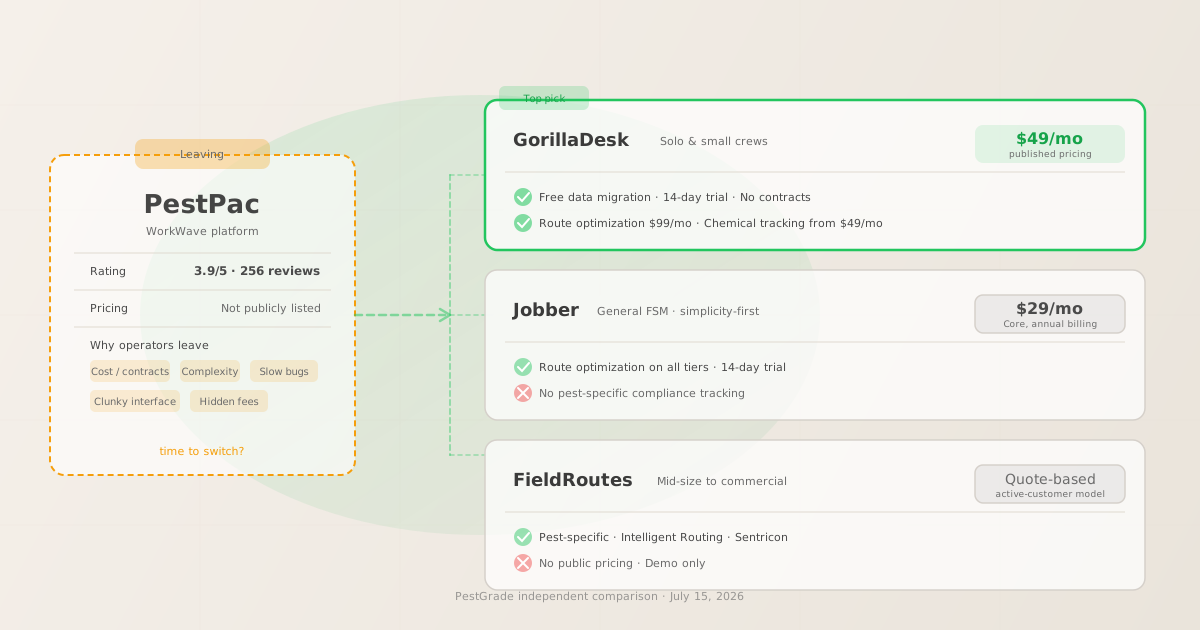
For most solo and small-crew operators leaving PestPac: GorillaDesk ($49/mo, no contracts, free data migration). For mid-size commercial operations: FieldRoutes or GorillaDesk Growth ($149/mo). The pattern in 256 GetApp reviews is consistent: cost and complexity push operators out; simpler tools with published pricing pull them in.
The short answer, who should switch and where to go
- Leaving because PestPac is too expensive or too complex for your operation size: GorillaDesk
- If your operation runs 1–10 technicians and PestPac’s cost, contract terms, or interface complexity no longer fit your reality, GorillaDesk is the most-cited destination in the operator community. It earns 4.8/5 from 277 GetApp reviews versus PestPac’s 3.9/5 from 256 reviews (both verified July 15, 2026). GorillaDesk Basic starts at $49/mo with published pricing, no contracts, no setup fees, and free data migration advertised. GorillaDesk Pro ($99/mo) adds Drive Matrix route optimization and subscription billing. For most small pest operators leaving PestPac for simplicity or cost, this is the practical first destination.
- Leaving because PestPac’s interface is outdated but you still need commercial pest depth: FieldRoutes
- If your operation runs 10–50+ technicians, manages commercial accounts, and is leaving PestPac specifically because of UI/UX frustration or slow bug resolution, not because you want to scale down, FieldRoutes is the comparable commercial-grade alternative. Like PestPac, it is purpose-built for pest control and includes Intelligent Routing, Sentricon integration, commercial trend reporting, and material tracking. Unlike PestPac, it does not publish pricing; pricing is custom-quoted based on active customer count. Before committing, compare FieldRoutes’ quoted price against GorillaDesk Growth ($149/mo, published) to ensure the switch is worth the migration effort.
- Leaving because PestPac is more than you need (over-engineered for your operation): Jobber or GorillaDesk
- PestPac is built for mid-to-large commercial pest operations. If you are running a solo to 5-tech residential-focused operation that uses maybe 20% of PestPac’s features, the platform’s cost and complexity represent overhead, not value. Both GorillaDesk and Jobber offer lighter-weight tools with modern UX and published pricing. Jobber Core ($29/mo or $43/mo annual, 1 user) is the lowest-entry option; Jobber Connect ($99/mo annual) adds recurring jobs; routing unlocks at Grow ($149/mo annual). GorillaDesk includes pest-specific chemical tracking from the $49/mo Basic plan, a feature Jobber doesn’t include at any tier.
- Staying on PestPac makes sense if: you run a large commercial operation and PestPac is working
- PestPac is the right tool for operations with multi-location commercial accounts, large route portfolios, and compliance-heavy workflows at scale. If PestPac’s features are actively used, IPM tracking, CustomerConnect+ Logbook, Smart trap integration, multi-unit scheduling, and cost is not the primary pain point, switching carries real migration risk without a guaranteed net improvement. The 3.9/5 average on GetApp includes a 49% 5-star rating; the operators who love PestPac tend to be the ones using it for commercial work it is actually designed for.
Signs you’ve outgrown (or under-grown into) PestPac
- You’re paying for features you never use
- PestPac’s Professional and Enterprise tiers are built for commercial pest management at scale, IPM support, multi-unit management, smart trap integration, advanced accounting, custom reporting. If your operation is primarily residential recurring accounts with a single route, you are likely paying for commercial feature depth you do not use. GetApp reviewers in the 1-2 star category most commonly cite cost as the primary frustration, with several noting that “better alternatives are available with superior ease-of-use.”
- Your technicians complain about the mobile app
- PestPac’s mobile experience is a consistent friction point in operator reviews. If field techs are calling in jobs, paper-logging applications, or finding workarounds for mobile workflows, you are paying for a mobile field app that is not reducing your field overhead. GorillaDesk and Jobber both score higher on mobile usability in comparative reviews. A newer operator who onboards on GorillaDesk will typically report less mobile friction than a team migrating from PestPac.
- You can’t get timely answers on bugs or support requests
- One of the most consistent patterns in PestPac’s negative reviews is slow resolution of technical issues. GetApp reviewers report waiting “days or weeks” for fixes on issues that interrupt field operations (verified from GetApp, July 15, 2026). If you are experiencing operational disruptions and waiting on vendor support, this is a platform fitness issue, not just a support ticket queue issue.
- You feel locked in on contracts you can’t exit
- PestPac does not publish its contract terms; reviewers consistently describe feeling “locked into contracts” and cite expensive data migration services when transitioning. If your contract renewal is approaching, this is the lowest-risk window to plan a migration. If you are mid-contract, factor in any early termination costs before calculating whether switching is net-positive for the year.
Best-fit replacements by situation
| Operator situation |  GorillaDesk GorillaDesk |
 FieldRoutes FieldRoutes |
 Jobber Jobber |
|---|---|---|---|
| Entry price | $49/mo (Basic) | Not publicly listed | $29/mo Core (annual, 1 user) |
| Route optimization | ✓ Pro $99/mo (Drive Matrix) | ✓ Both tiers (Intelligent Routing) | ✓ All tiers |
| Chemical / compliance tracking | ✓ Basic $49/mo onward | ✓ Both tiers | ✗ Not included |
| Recurring / subscription billing | ✓ Pro $99/mo | ✓ Both tiers | ✓ Connect $99/mo annual |
| Sentricon / commercial features | Not documented | ✓ Both tiers | ✗ Not documented |
| Free data migration | ✓ Advertised on-site | Not publicly documented | Not publicly documented |
| Free trial | ✓ 14 days, no credit card | ✗ Demo only | ✓ 14 days |
| Contract terms | No contracts, no setup fees | Not publicly listed | No contracts on annual billing |
| GetApp rating | 4.8/5, 277 reviews | 4.3/5, 403 reviews | 4.6/5, 1,463 Capterra reviews |
| Best for | Solo to 15 techs, pest-specific compliance | 10–50+ techs, commercial-heavy | Solo/small, general FSM, simplicity-first |
Sources: gorilladesk.com/pricing (verified July 15, 2026); fieldroutes.com/pricing (verified July 15, 2026); getjobber.com/pricing (Jobber, pricing last verified July 11, 2026 from published sources); GetApp ratings verified July 15, 2026; Capterra Jobber rating from published Capterra listing. GorillaDesk and FieldRoutes highlighted column reflects the primary recommendation split by size.
How migration actually works, data export, contracts, timing
- Step 1: Understand what data you need to export from PestPac
- Before contacting PestPac about data export, inventory what data your new platform needs. At minimum: (1) Customer records, name, contact, address, service location details; (2) Active recurring schedules and service agreements; (3) Service history per account (3–5 years minimum for commercial accounts); (4) Chemical application records if you are in a compliance-sensitive state; (5) Active payment methods / card-on-file records (note: raw card data cannot be migrated between PCI-compliant processors, customers will need to re-enter payment info on the new platform). Contact PestPac support to request your data exports. PestPac does not publicly document the format or process for data exports, so allow lead time for this conversation before your migration window.
- Step 2: Get your migration plan from the new platform before committing
- GorillaDesk advertises free data migration and has a customer success team that handles imports from major platforms. Before signing up, confirm with GorillaDesk what data it can import from PestPac and in what format. FieldRoutes has a similar onboarding process for mid-size operators. Jobber has data import tools for standard CSV formats. For any platform, the migration conversation should happen during the free trial period, not after you have cancelled PestPac.
- Step 3: Time the switch at your contract renewal
- If PestPac has a contracted term, the lowest-risk exit point is your renewal date. Check your current agreement for auto-renewal clauses, many platform contracts auto-renew 30–60 days before the end date, which means you need to notify PestPac of non-renewal earlier than you might expect. If you are month-to-month, plan the migration for your slowest season. Most US pest operators have lower service volume in late fall (October–December), giving technicians more time for retraining without disrupting peak-season operations.
- Step 4: Run both systems in parallel for at least two weeks
- Do not cancel PestPac access the day you activate your new platform. A parallel-run period of 2–4 weeks allows you to: (a) verify that all customer records imported correctly; (b) confirm that recurring schedule logic carried over; (c) retrain technicians on the new mobile app before it is their only tool in the field; (d) catch any data discrepancies before they become customer service issues. Budget for one month of dual subscription cost as part of the migration expense. This is normal and expected for any platform transition of this scale.
- What operators who switched report
- GetApp reviewer patterns for PestPac include consistent references to operators who moved to GorillaDesk or Jobber citing “superior ease of use” and a modern interface as the primary improvement (GetApp, 256 reviews, verified July 15, 2026). The transition period is uniformly described as requiring time investment, but the post-migration experience for operators who moved to a simpler, lighter-weight platform is generally positive, fewer workarounds in the field, faster invoice cycles, and more accessible support response times. The operators who report regret about switching are those who moved to a platform that lacked features they were actually using in PestPac (typically commercial compliance documentation), not those who moved for simplicity.
What operators say about switching from PestPac
- The most common switching motivation: cost and interface
- From GetApp’s 256 PestPac reviews (verified July 15, 2026), the most consistent frustrations among lower-rated reviews are (1) high base cost plus module add-ons and (2) a clunky or outdated interface. Operators describe PestPac as something that worked when they first set it up but became increasingly costly relative to available alternatives as GorillaDesk and other modern platforms gained features at lower price points. The rating gap is meaningful: GorillaDesk averages 4.8/5 vs PestPac’s 3.9/5, a 0.9-point difference across a large review base that consistently tracks to UI/UX and cost satisfaction.
- What operators lose when they leave
- PestPac has genuine strengths for commercial pest operations: CustomerConnect+ Logbook for audit preparation, IPM tracking, Smart trap integration, and multi-unit building management are purpose-built capabilities that no lighter-weight platform fully replicates. Operators who run significant commercial accounts, particularly food service, healthcare, or multi-location facility clients, should audit whether their new platform covers these workflows before migrating. GorillaDesk Growth ($149/mo) covers pest compliance and multi-branch support but does not have a direct equivalent to PestPac’s IPM logbook. FieldRoutes is the closest commercial-feature equivalent.
- Pricing and support improvement are the most-cited positives post-switch
- Operators who moved to GorillaDesk from PestPac most consistently cite three improvements: (a) published pricing they can plan around without surprises; (b) faster and more accessible customer support; (c) a mobile app their technicians use without friction. These are consistent with GorillaDesk’s 4.8/5 rating across 277 reviews. For a small residential pest operation, these quality-of-life improvements can meaningfully reduce administrative overhead even if the commercial feature depth is shallower.
Sources: GetApp PestPac listing (256 reviews, verified July 15, 2026); GetApp GorillaDesk listing (277 reviews, verified July 15, 2026); GetApp FieldRoutes listing (403 reviews, verified July 15, 2026). All feedback is pattern-level synthesis from named review platforms, not first-hand use of any platform. PestGrade builds none of the tools it grades. How we grade →
For most operators leaving PestPac: GorillaDesk
For solo to mid-small pest operations leaving PestPac for cost, complexity, or modern UX, GorillaDesk Basic ($49/mo) is the most accessible starting point. Start the 14-day free trial. Ask the GorillaDesk team about data migration from PestPac during the trial before cancelling your PestPac subscription. If you run routes, verify GorillaDesk Pro ($99/mo) covers your routing needs before committing.
PestGrade is reader-supported. When you sign up for a tool through our links, we may earn a commission, at no cost to you, and it never affects our rankings. How we grade →
For mid-size commercial operations leaving PestPac: FieldRoutes
For a 10–50-tech pest operation that still needs commercial pest depth (Sentricon, IPM tracking, commercial reporting) but is leaving PestPac for reliability or UI reasons, FieldRoutes is the closest commercial-grade alternative. Request a demo and compare the Growth tier quoted price against GorillaDesk Growth ($149/mo, published pricing) before deciding.
PestGrade is reader-supported. When you sign up for a tool through our links, we may earn a commission, at no cost to you, and it never affects our rankings. How we grade →
See the full alternatives comparison: PestPac Alternatives (2026). Full platform breakdowns: GorillaDesk review, PestPac review, or how we grade →
Last verified: July 15, 2026. PestPac pricing page and features verified from pestpac.com on July 15, 2026. GorillaDesk pricing verified from gorilladesk.com/pricing on July 15, 2026. FieldRoutes pricing verified from fieldroutes.com/pricing on July 15, 2026. GetApp ratings for PestPac, GorillaDesk, and FieldRoutes verified July 15, 2026. Jobber pricing last verified July 11, 2026. This assessment is based on public pricing pages, vendor documentation, and verified user reviews, not hands-on use in a live pest control business. PestGrade builds none of the tools it grades. How we grade →
Frequently asked questions
What is the best replacement for PestPac?
For solo to small crews (1–10 techs) leaving for cost or complexity: GorillaDesk Basic ($49/mo, no contracts, free data migration, 4.8/5 from 277 reviews). For mid-size commercial operations: FieldRoutes (purpose-built, quote-based pricing). For simplicity-first solo operators: Jobber Core ($29/mo annual). Ratings sourced from GetApp, verified July 15, 2026.
How do you migrate data out of PestPac?
Contact PestPac support directly to request your data export, the process is not publicly documented. Export at minimum: customer records, service history, recurring schedules, and payment info. GorillaDesk advertises free data migration assistance from major platforms (verified gorilladesk.com, July 15, 2026). Run both systems in parallel for 2–4 weeks to catch import errors before cancelling PestPac access.
Is it hard to switch from PestPac?
The migration itself requires real effort (data export, import verification, staff retraining). But operators who moved to GorillaDesk or Jobber consistently describe the new platform as significantly easier to use after the transition, PestPac’s steep learning curve means the destination is usually less complex, not more. Plan for 2–4 weeks of parallel systems and one month of dual subscription cost.
Does GorillaDesk migrate PestPac data?
GorillaDesk advertises free data migration as part of onboarding (gorilladesk.com, verified July 15, 2026). Confirm the specific format they can import from PestPac during your 14-day trial before making a final decision. GorillaDesk starts at $49/mo with no contracts and no setup fees.
When is the best time to switch from PestPac?
At your contract renewal date to avoid early termination costs. Check for auto-renewal clauses (typically 30–60 days before end date). If month-to-month, migrate in your slow season (late fall for most US pest operators). Always run both systems in parallel for at least two weeks before cutting over.