Switching from Pocomos: how to migrate and what to move to (2026)
PestGrade is reader-supported. When you sign up for a tool through our links, we may earn a commission, at no cost to you, and it never affects our rankings. How we grade →
For most residential pest operators leaving Pocomos, the destination is GorillaDesk ($49/mo flat, chemical tracking from entry, routing from $49/mo, confirmed recurring billing at $99/mo Pro). If you run an active D2D canvassing program with 4+ technicians and a small customer base, the unlimited-user math may still favor Pocomos. Here is the independent breakdown of who should switch, where to go, and how migration works.
The short answer: who should switch and where to go
- Most residential pest operators (1–8 techs, no active D2D canvassing): GorillaDesk
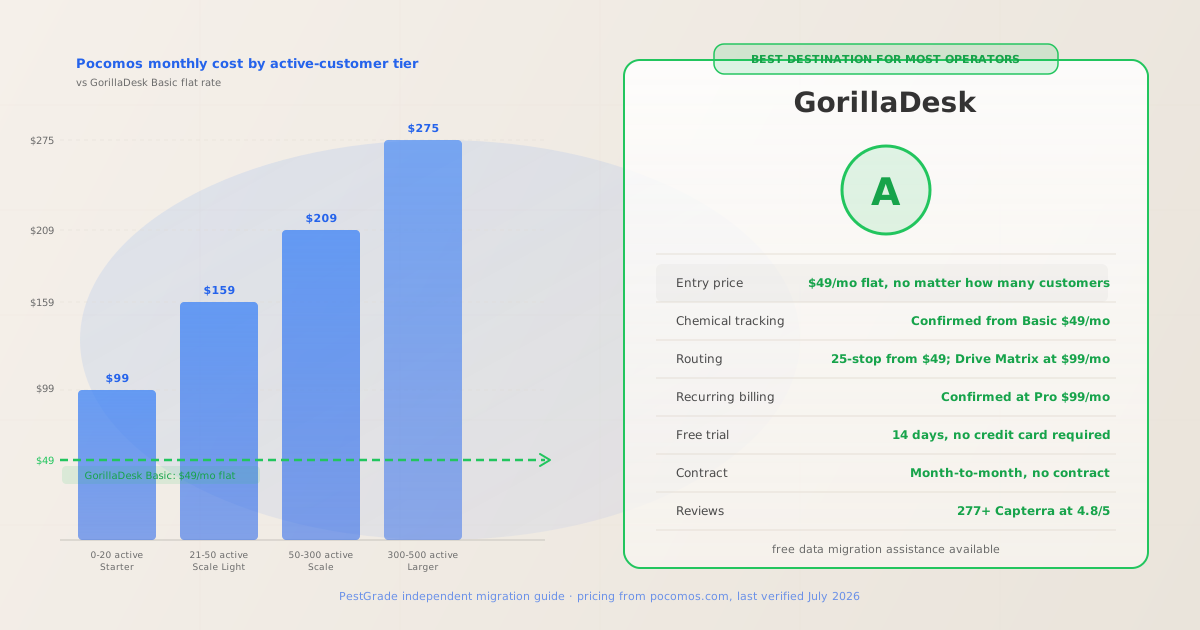
- Once your active customer base grows past 20 accounts, Pocomos costs $159/mo; past 50 accounts, $209/mo. GorillaDesk Pro ($99/mo) includes Drive Matrix route optimization, confirmed subscription billing, chemical tracking, customer portal, and QuickBooks sync at that price point, regardless of how many customers you serve. For a solo operator, GorillaDesk Basic at $49/mo starts $50/mo cheaper than Pocomos Starter. See our Pocomos vs GorillaDesk head-to-head for the full cost comparison.
- Multi-tech D2D canvassing operations with small customer bases: stay on Pocomos or evaluate carefully
- Pocomos’s unlimited-user model, D2D canvassing CRM (territory management, canvassing leaderboards, electronic door contracts), and visual route optimization are genuine differentiators for operations running door-to-door programs. If your operation has 4–8 technicians with under 20–30 active accounts, the unlimited-user pricing may still beat per-seat or per-tech tools. Evaluate the full migration cost (retraining, data transfer, rebuilding canvassing workflows) before committing to a switch.
- Multi-trade operations (pest plus lawn or other services): Jobber
- Jobber Core at $49/mo monthly offers scheduling, invoicing, customer management, and a broad integration library built for mixed field-service businesses. Routing unlocks at Connect ($139/mo monthly). Jobber has no chemical tracking at any tier, so it is not the right call for compliance-first pest shops. But for operators running multiple service lines, Jobber’s generalist depth and 1,471 GetApp reviews at 4.6/5 make it the safer multi-trade pick over Pocomos.
- Commercial multi-truck operations (10+ techs): FieldRoutes
- FieldRoutes (ServiceTitan-owned, custom active-customer pricing) offers enterprise route automation, a full marketing automation suite, and Sentricon bait-station integration for commercial operations. Neither FieldRoutes nor Pocomos publishes transparent pricing at scale, so the comparison requires a direct demo. See our best for commercial accounts guide for the full enterprise comparison.
When the math turns against Pocomos
Pocomos charges by active customer count, not by user or technician. Every plan includes unlimited users. Pricing last verified July 19, 2026 from pocomos.com/pricing; the site was unavailable for re-verification August 12, 2026. Contact Pocomos directly to confirm current pricing before any commitment decision.
| Active customers | Pocomos tier | Pocomos cost/mo | GorillaDesk equivalent | GorillaDesk cost/mo |
|---|---|---|---|---|
| 0–20 | Starter | $99 | Basic (chem tracking, 25-stop routing) | $49 |
| 21–50 | Scale Light | $159 | Basic + Pro feature gap | $49–$99 |
| 51–300 | Scale | $209 | Pro (Drive Matrix, recurring billing, QB) | $99 |
| 301–500 | Larger | $275 | Growth (multi-branch, pipeline, custom fields) | $149 |
Pocomos pricing from pocomos.com/pricing, last verified July 19, 2026. GorillaDesk pricing from gorilladesk.com/pricing, verified August 10, 2026. All tiers compared at unlimited users; GorillaDesk prices are per-month, month-to-month. GorillaDesk does not charge per active customer.
The breakeven point. A solo operator or 2-tech shop on Pocomos Starter ($99/mo) is already paying $50/mo more than GorillaDesk Basic. Once the customer base grows past 20 accounts, the gap widens to $60–$110/mo. At 50–300 customers, Pocomos Scale at $209/mo costs $110/mo more than GorillaDesk Pro ($99/mo), which includes Drive Matrix routing, subscription billing, QuickBooks sync, and a customer portal, features that materially overlap Pocomos’s offering at the Scale tier.
When the unlimited-user model wins. If your operation has 6 or more technicians and all of them log into the platform daily, Pocomos’s unlimited-user model can outperform per-seat tools (like Jobber at $29/mo per additional user). The model also benefits operations with dedicated office staff who use the platform for dispatching and invoicing, since those users don’t count toward the active-customer limit. The math only favors Pocomos in this configuration when combined with a small active-customer base (under 20–30 accounts) and active D2D canvassing use of the CRM.
Best-fit replacements compared
Compiled from verified vendor pricing pages (GorillaDesk and Jobber August 10, 2026; Fieldwork August 12, 2026). Pocomos pricing from pocomos.com/pricing, last verified July 19, 2026.
| Feature | Pocomos (leaving) |  GorillaDesk GorillaDesk |
 Jobber Jobber |
Fieldwork |
|---|---|---|---|---|
| Entry price | $99/mo (0–20 active customers) | $49/mo flat (Basic) | $49/mo (Core, monthly) | $59/mo (Startup, per tech) |
| Pricing model | Per active customer count | Flat monthly tiers | Per user (flat tiers) | Per field technician |
| Chemical tracking | ✓ Listed from Starter | ✓ Confirmed from $49/mo | ✗ No tier includes it | ✓ CA/NY formats at $79/mo |
| Route optimization | ✓ Listed from Starter | ✓ 25-stop from $49; Drive Matrix at $99 | ✓ At Grow ($199/mo monthly) | ✓ At Business ($79/mo) |
| Recurring billing | ✓ Listed from Starter | ✓ Confirmed at Pro $99/mo | ✓ Recurring jobs from Core | Not confirmed on public pages |
| D2D canvassing CRM | ✓ Territory mgmt, leaderboards, door contracts | ✗ Not a feature | ✗ Not a feature | ✗ Not a feature |
| Free trial | Not publicly listed | 14 days, no credit card | 14 days, no credit card | 2 weeks, no credit card |
| Contract terms | Not publicly listed | Month-to-month, no contract | Month-to-month or annual (savings) | Not publicly listed |
| Data migration | Contact vendor; not documented | Free migration assistance advertised | Self-serve CSV import | Contact vendor |
| Verified reviews | 35 GetApp at 4.5/5 | 277+ Capterra at 4.8/5 | 1,471 GetApp at 4.6/5 | 26 Capterra at 4.9/5 |
GorillaDesk and Jobber pricing verified August 10, 2026. Fieldwork verified August 12, 2026. Pocomos pricing last verified July 19, 2026. Review counts from GetApp/Capterra as of respective verification dates.
How migration actually works from Pocomos
Pocomos does not publicly document its data export process. The steps below reflect standard industry migration practice; always verify the exact export steps with Pocomos support before starting. This is based on public documentation and platform norms, not hands-on use.
- Step 1: Request your data export before signing up for the destination platform
- Contact Pocomos support and request a complete data export covering: customer records (name, address, contact info, service notes), active recurring service agreements and their billing schedules, full service history per account, chemical application and material usage logs, route assignments, D2D canvassing records and lead history. Confirm the file format (CSV is standard) before selecting a destination platform. If the format is incompatible with GorillaDesk’s importer, contact GorillaDesk’s migration team early; they advertise free migration assistance and can advise on format requirements.
- Step 2: Payment cards cannot transfer
- Stored payment card data is PCI-scoped and cannot move between payment processors. Customers with card-on-file for recurring billing will need to re-enter their payment details in the new platform before the next billing cycle. Build a communication plan for this: a text or email with a link to the new payment portal. Time this during a lower-volume period, not mid-quarter when recurring charges are concentrated. If your Pocomos billing runs a large number of cards in the same week, this re-authorization step is the highest-friction part of the switch.
- Step 3: Run both platforms in parallel for 2–4 weeks
- Do not cancel Pocomos access until you have verified the data import in the destination platform and your technicians are comfortable with the new mobile app. Running both platforms simultaneously for 2–4 weeks costs one month of dual subscriptions but prevents the scenario where an import error means losing service history for active accounts. GorillaDesk’s free trial runs 14 days, enough to start the parallel-run before the first billing period. Use this period to confirm that recurring service agreements, chemical log formats, and route data have transferred correctly.
- Step 4: Confirm your Pocomos contract terms before canceling
- Pocomos does not publicly list its contract or cancellation terms. Contact Pocomos support directly and ask: (a) Is there a minimum contract period? (b) What is the notice period required to cancel? (c) Are there any cancellation fees? Get the answer in writing (email) before you give notice. This step is often skipped by operators in a hurry and can result in an unexpected additional billing cycle. For tools that do publish contract terms (GorillaDesk, Jobber), month-to-month is standard with no cancellation fee, making them easier to exit if the migration does not go smoothly.
What Pocomos operators say
Synthesized from 35 verified GetApp and SoftwareAdvice reviews (4.5/5 overall), as of August 2026. No first-hand testing by PestGrade; assessments are from public review platforms. Review volume is smaller than category leaders (GorillaDesk: 277+, Jobber: 1,471), so patterns may shift as more reviews are published.
- What operators consistently praise
- The unlimited-user pricing model is the most-cited positive, particularly among operations with 4–8 technicians. Multiple reviewers note that all-in-one access for every staff member, no per-seat charge, meaningfully reduces software overhead for multi-tech shops. Customer support response times are consistently rated highly, with reviewers citing 10–20 minute response windows on GetApp. The D2D canvassing CRM (territory management, canvassing leaderboards, lead tracking, and electronic door contracts) receives strong marks from operations that actively use it as a customer acquisition workflow. Route optimization from the Starter tier is also cited as working reliably for day-to-day dispatch.
- What frustrates operators, including those who switched
- The most common frustration pattern among reviewers who mention cost is the active-customer pricing escalation: operations that started at Starter ($99/mo) found their monthly bill increasing as the customer base grew, with the jump from Starter to Scale Light ($160 to $159/mo at 21 customers) feeling abrupt for operations in active growth. A secondary pattern is the smaller community and documentation footprint compared to GorillaDesk or Jobber, which means fewer third-party tutorials, integrations, and community forum answers when something needs troubleshooting. Contract terms and cancellation policy are not confirmed on public pages, which a subset of reviewers note created friction when evaluating alternatives.
- Who Pocomos is wrong for
- Solo operators or 1–2 tech shops that do not run D2D canvassing are paying for an unlimited-user model and a canvassing CRM they don’t use. The $99/mo entry price is double GorillaDesk Basic ($49/mo) for similar pest scheduling and chemical tracking capabilities. Operations that have grown their customer base past 50 accounts are paying $209/mo for Pocomos Scale versus $99/mo for GorillaDesk Pro, a $110/mo gap for largely overlapping functionality. Any operation needing recurring billing confidence for quarterly or annual service plans should note that GorillaDesk explicitly documents subscription billing at its Pro tier; Pocomos lists it, but independent confirmation of implementation detail is harder to find at the small-sample review volume available.
Who should stay on Pocomos
Switching has real costs: data export time, re-authorizing customer payment cards, retraining technicians, and rebuilding any canvassing workflows. Not every Pocomos operator should leave.
- Active D2D canvassing operations with dedicated teams
- Pocomos’s D2D canvassing CRM (territory management, canvassing leaderboards, lead tracking, and electronic door contracts at the door) is a purpose-built tool that GorillaDesk, Jobber, and Fieldwork do not replicate. If your operation doors a territory and converts from canvassing, that workflow is embedded in Pocomos in a way that rebuilding elsewhere requires time and process change. Operators where D2D drives meaningful revenue should weigh the canvassing CRM value against the cost escalation math before deciding.
- Multi-technician shops with under 20–30 active customers
- At the Starter tier ($99/mo, 0–20 active customers), a 4–6 technician shop where everyone logs into the platform daily may find the unlimited-user model cheaper than per-seat pricing for comparable tools. If you have 5 techs and are paying $99/mo for all of them on Pocomos, the only comparable at GorillaDesk is five separate Growth accounts ($149/mo each) which would be much higher. Note, however, that GorillaDesk’s Growth plan at $149/mo is per-account (not per-seat in the same way), so verify the specific use case with GorillaDesk before assuming this math holds in your situation.
- Operations satisfied with routing and support response times
- Pocomos scores 4.5/5 from 35 verified reviews, with consistent praise for responsive support and reliable route optimization. If the platform is working well for your operation and your customer base is stable below the next pricing threshold, the switching cost may not be worth the savings. Switching costs are real; the GorillaDesk savings from $209/mo to $99/mo ($110/mo) take about 4–6 months to break even after accounting for migration labor.
Our pick for most operators leaving Pocomos: GorillaDesk
GorillaDesk matches or exceeds Pocomos on chemical tracking, route optimization, and billing, at $49/mo Basic or $99/mo Pro, with a flat monthly price that does not escalate as your customer count grows. The 14-day free trial and free migration assistance lower the switching risk. 277+ Capterra reviews at 4.8/5 provide significantly more independent validation than Pocomos’s 35-review base.
PestGrade is reader-supported. When you sign up for a tool through our links, we may earn a commission, at no cost to you, and it never affects our rankings. How we grade →
Jobber is the better pick for multi-trade operations. See our Jobber review or best for small business guide for per-situation picks.
FAQ
- What is the best alternative to Pocomos for most pest operators?
- GorillaDesk: $49/mo Basic (flat rate, chemical tracking from entry, 25-stop routing, no contracts), $99/mo Pro (Drive Matrix routing, subscription billing, QuickBooks sync, customer portal). 277+ Capterra reviews at 4.8/5. 14-day free trial, no credit card. Free data migration assistance. GorillaDesk’s flat pricing does not escalate with customer count.
- Why do operators leave Pocomos?
- The primary driver is cost escalation: Pocomos charges by active customer count rather than per user, so monthly costs step up from $99 (0–20 customers) to $159 (21–50) to $209 (51–300) to $275 (301–500) as the business grows. An operation growing from 15 to 60 customers sees its monthly bill more than double while GorillaDesk Pro holds at $99/mo. Secondary reasons include: no publicly listed free trial, smaller review base for independent validation, and contract terms not disclosed on the public website.
- What data can you export from Pocomos?
- Pocomos does not publicly document its export process. Contact Pocomos support directly and request: customer records, service history, chemical logs, recurring agreements, route assignments, and D2D canvassing records. Payment card data is PCI-scoped and cannot transfer; customers re-enter payment details on the new platform. GorillaDesk advertises free data migration assistance and can advise on format compatibility.
- How long does switching from Pocomos take?
- Plan for 4–8 weeks: 1–2 weeks for data export from Pocomos, 1–2 weeks to import and verify in the destination platform, 2–4 weeks of parallel running before full cutover. Budget one month of dual subscription costs. Confirm the Pocomos cancellation policy directly before giving notice, as contract terms are not publicly listed.
- Should D2D pest operations switch from Pocomos?
- Not necessarily. Pocomos’s D2D canvassing CRM (territory management, leaderboards, electronic door contracts) is purpose-built for operations that acquire customers by door-to-door canvassing. GorillaDesk, Jobber, and Fieldwork do not offer equivalent D2D tools. If D2D drives meaningful customer acquisition, weigh the full migration cost against the pricing savings before switching.
Last verified: GorillaDesk pricing August 10, 2026 from gorilladesk.com/pricing. Fieldwork pricing August 12, 2026 from fieldworkhq.com/pricing. Pocomos pricing last verified July 19, 2026 from pocomos.com/pricing; site was unavailable for re-verification on August 12, 2026. Jobber pricing from jobber.com/pricing, verified August 10, 2026. Review counts from GetApp/Capterra/SoftwareAdvice as of August 2026. This guide is based on public pricing pages, vendor documentation, and verified user review synthesis, not hands-on use of the software. See how we grade.